Hi, this page covers many of the things I've learned and found when using Squarp Pyramid
Hold rec and turn an encoder in step mode to affect the entire track.
Use the "Edit all notes" trick above and move offset down to zero
Offsets are dynamic, that is, they change depending on the zoom level. They are also implemented in a controversial way, 0 to 100%, instead of ±50% (this is how Elektron does it). People complain about them due to notes getting strangely grouped when played near each other, but still offset. For example a chord that is slightly off could result in two notes having an offset of zero on the 5th step, but one note having an offset of 99 on the 4th step (played just slightly too early). Why would Squarp do this? My theory is (confirm in the forum) that it's because the Pyramid has to always write valid midi files that satisfy the midi specification. How, I a midi file, could you specify a note before the beginning of the file? While that seems strange to hear, think of overdubbing on a loop. As the loop reaches the end you go to play a chord on the 1. But some notes are just a little early. The loop is a midi part, and there (maybe) no way to say this is early on the 1, because that's the start. Instead they have to say this is late on the 4.
In Live mode chord smartpads have "tonality" and "complexity" settings. Holding 2nd + turning the main encoder changes the tonality by a half step. Turning the main encoder without holding 2nd cycles through a set of harmonic relationships to the major tonality. These relationships are as follows:

The three groupings imply the relatedness of the keys
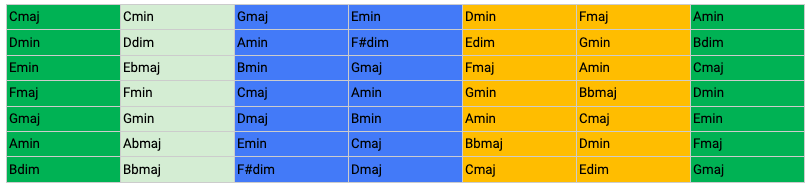
It's important to note that you can hold 2nd and turn the main encoder from any of the harmonic relationships, essentially changing the Major tonality. To avoid confusion it's good to return to the Major tonality and adjust there, or the relationships will appear strange.
It's also worth noting that the scale smartpad root note will change along with the root note of the tonality chosen.
Like the chord smartpads in Live mode, Step chords have the same harmonic relationships, available by turning encoder 2. Both the complexity and Major tonality will be inherited from what is set in Live modes chord smartpads.
You can then use the main encoder wheel to choose the chord within the tonality chosen.